
Download Mouse Wheel Control – Customize Scroll Speed on Windows, Free & Secure
Looking to fine-tune your mouse experience on Windows? Mouse Wheel Control is a lightweight, free utility that gives you full control over your mouse wheel behavior. Whether you're browsing web pages, scrolling through long documents, or navigating spreadsheets, this tool helps you adjust the scroll speed, the number of lines per notch, and even set application-specific scrolling preferences.
Developed by Ardamax and available since 2006, Mouse Wheel Control has earned a solid reputation for reliability and simplicity. With over 4,700 downloads and steady usage in countries like Brazil, the Philippines, and China, it remains a trusted choice for users seeking a smoother, more efficient workflow. Despite its age, the software continues to function well on modern Windows systems, including Windows 10 and 11.
It’s especially useful for those who find the default scroll speed too fast or too slow. Best of all, it’s completely free to download and use, with no hidden costs or intrusive ads. If you're looking for a secure, easy-to-use tool to enhance your mouse performance, Mouse Wheel Control is a must-try.
Key Features of Mouse Wheel Control
Mouse Wheel Control delivers powerful functionality without the complexity. One of its standout features is the ability to adjust the number of lines scrolled per mouse wheel notch. By default, most Windows systems scroll three lines at a time, but this can feel too abrupt or too sluggish depending on your screen resolution and task. With Mouse Wheel Control, you can reduce it to one line for precise navigation or increase it to ten or more for faster scrolling through long documents. This level of customization is ideal for users working with PDFs, code files, or large spreadsheets where accuracy matters.
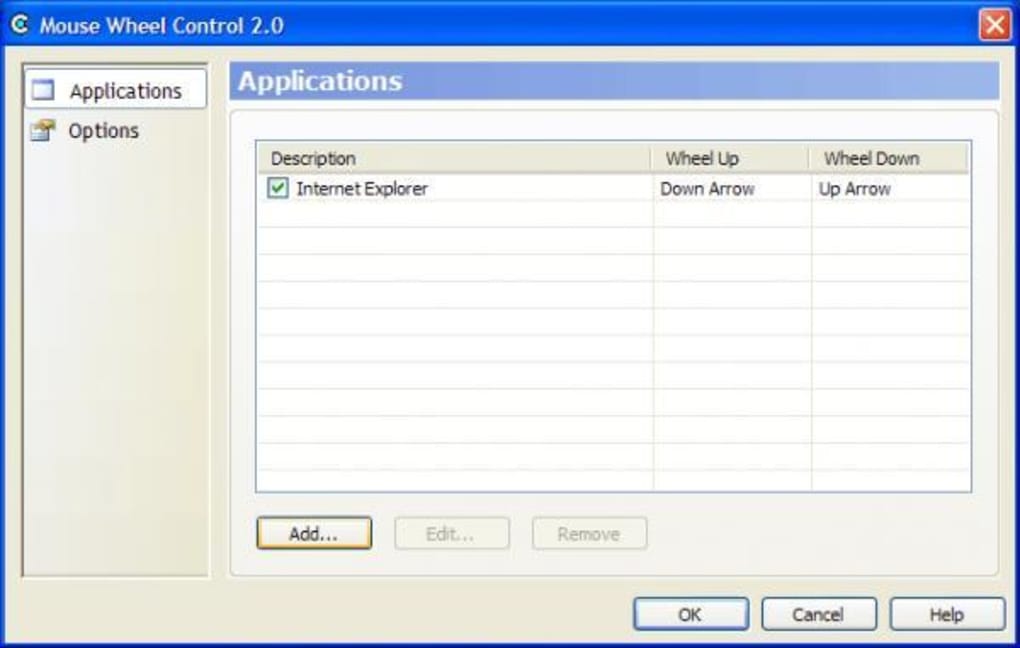
Another major advantage is application-specific scroll settings. You can configure different scroll behaviors for different programs—such as slow scrolling in web browsers for better readability, faster scrolling in file explorers for quicker navigation, and medium speeds in word processors. This flexibility ensures a tailored experience across your entire workflow. The tool also supports smooth scrolling adjustments, which can make navigation feel more fluid and natural, especially on high-DPI displays.
Despite being released in 2006, the software remains lightweight and efficient, consuming minimal system resources. It runs in the background without slowing down your computer, making it perfect for older machines or systems with limited RAM. The interface is clean and intuitive, requiring no technical expertise—just a few clicks to set your preferences.
Plus, it’s fully portable, meaning you can run it from a USB drive without installation. Whether you're using Windows 98 or Windows 11, this tool adapts seamlessly. With no ads, no telemetry, and no unnecessary features, Mouse Wheel Control is a refreshingly honest utility that focuses on one thing: better mouse wheel control.
How to Install and Use Mouse Wheel Control
Getting started with Mouse Wheel Control is simple and hassle-free. Since it’s a portable application, you don’t need to go through a traditional installation process. First, visit a trusted software download site and search for Mouse Wheel Control.
Download the latest version (2.0) in the .zip format. Once downloaded, extract the files to a folder of your choice—such as your desktop or a dedicated tools folder. You’ll find an executable file named MouseWheelControl.exe.
Double-click it to launch the program.
Upon opening, the application runs silently in the system tray (near the clock). Right-click the icon to access the settings menu. From there, you can adjust the scroll lines per notch using a simple slider or input field.
You can also enable or disable smooth scrolling and set different behaviors for specific applications. To do this, click on the "Add Application" button and select the program from your system (e.g., Chrome, Word, Explorer). Then, define the scroll speed just for that app.
Once configured, the settings apply immediately. You can test them by opening a document or webpage and using your mouse wheel. The changes are responsive and intuitive.
The tool also supports quick toggling—you can disable scroll control temporarily if needed. There’s no need to restart your computer or close other programs. When you’re done, simply close the application or let it run in the background.
Since it’s lightweight, it won’t interfere with your system performance. For users who prefer a command-line interface or automation, the tool also supports batch configuration via configuration files. Overall, Mouse Wheel Control is designed for ease of use, making it accessible to both beginners and advanced users.
Compatibility & System Requirements
Mouse Wheel Control is built to work across a wide range of Windows operating systems, making it one of the most versatile mouse utilities available. It officially supports Windows 98 and all subsequent versions, including Windows XP, Vista, 7, 8, 10, and 11. This broad compatibility ensures that even users with older machines can benefit from enhanced scroll control. The software is particularly praised for its ability to run smoothly on legacy systems where newer utilities may not be available.
Despite its age, Mouse Wheel Control performs reliably on modern hardware and high-resolution displays. It works seamlessly with both standard USB mice and advanced gaming mice, as long as they use the standard Windows mouse driver. The tool doesn’t require administrator rights to run, which makes it ideal for shared or restricted workstations. It’s also compatible with multiple mouse devices—if you have more than one mouse connected, you can configure scroll behavior independently for each.
For users on Mac or Linux, this tool isn’t available natively. However, alternative solutions like Scroll Reverser (for Mac) or libinput (for Linux) offer similar functionality. For Android and iOS users, there are no direct equivalents, as mobile devices don’t rely on mouse wheel input.
That said, the software remains a top choice for Windows users across all skill levels. Its lightweight design means it requires minimal disk space—typically less than 10 MB—making it ideal for low-storage environments. Whether you're a student, professional, or casual user, Mouse Wheel Control adapts to your needs without demanding high-end hardware.
Pros and Cons
- Pros:
- Free and secure download with no ads or malware
- Lightweight and fast—minimal impact on system resources
- Supports application-specific scroll settings for tailored control
- Easy to use with a clean, intuitive interface
- Portable—can run from USB without installation
- Compatible with Windows 98 to Windows 11
- Adjusts scroll speed, lines per notch, and smooth scrolling
- Cons:
- Older software—last updated in 2006, no official support
- No official updates or bug fixes since release
- Limited to Windows platforms only
- No built-in update checker or auto-update feature
- Basic UI—lacks modern design elements
Frequently Asked Questions (FAQ)
-
Is Mouse Wheel Control safe to download?
Yes, Mouse Wheel Control is safe to download when obtained from reputable software repositories. It has been used by thousands of users worldwide without reported malware or security issues. Always download from trusted sources to avoid modified or bundled versions.
-
Can I use Mouse Wheel Control on Windows 11?
Yes, Mouse Wheel Control works on Windows 11. Despite being released in 2006, it runs without issues on modern Windows systems due to its lightweight and compatible design. Many users report successful use on Windows 10 and 11.
-
Does Mouse Wheel Control require installation?
No, Mouse Wheel Control is a portable application. You can run it directly from a USB drive or any folder without installing it. Simply extract the .zip file and launch the .exe file.
-
Can I set different scroll speeds for different apps?
Yes, one of the key features is application-specific scroll settings. You can define unique scroll speeds for programs like Chrome, Word, Excel, and more, giving you full control over your experience.
-
Is there a newer version than 2.0?
No, version 2.0 is the latest release, and the developer has not issued any updates since March 22, 2006. While it remains functional, it lacks modern features and automatic updates.
Conclusion: A Timeless Tool for Better Mouse Control
Despite its age, Mouse Wheel Control remains a powerful and reliable utility for Windows users who want to fine-tune their mouse wheel behavior. Its ability to adjust scroll speed, lines per notch, and application-specific settings makes it an essential tool for productivity, browsing, and document work. While it lacks modern design and updates, its lightweight nature, portability, and zero cost make it a standout choice in the world of software utilities.
If you’re frustrated with default scroll speeds or want more control over your mouse experience, this free tool delivers exactly what it promises—simple, effective, and secure. It’s especially valuable for users on older systems or those who prefer minimal, no-frills software.
Download Mouse Wheel Control today and take back control of your scrolling experience—fast, free, and without compromise.







